UPI expense tracker: log a payment from its screenshot
TLDR Classic logs a UPI payment from the screenshot of its success screen. Share the screenshot to the app, and the amount, the payee and the date are read on your phone, with no AI, for you to confirm. It needs no SMS permission and no bank login. It is part of Pro, for ledgers in rupees.
Last updated
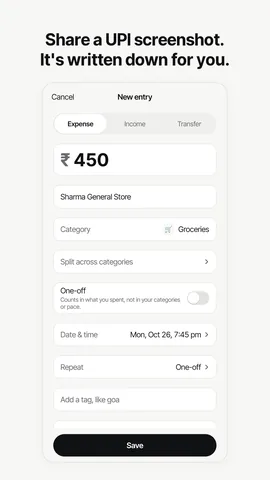
How it works
- Pay as you always do. Use Google Pay, PhonePe, Paytm, BHIM, Amazon Pay, CRED or your bank’s app. TLDR Classic doesn’t connect to any of them.
- Share the success screen to TLDR Classic. Take a screenshot, or use the UPI app’s own share button where it has one, and pick TLDR Classic. In the app, a long press on the form button also offers Add from screenshot.
- Check what was read. The amount, the payee, the date and time and the UPI transaction ID are read on your phone and shown on a confirm card. The category comes from how you filed that payee before, or from the app’s list of Indian merchants, and you can change anything.
- Save it. The entry is marked as from a UPI screenshot. The screenshot itself isn’t uploaded or kept, unless you attach it to the entry as a bill photo.
What it reads, and what it turns away
TLDR Classic knows the success screens of Google Pay, PhonePe, Paytm, BHIM, Amazon Pay, CRED and the major bank apps. From the screen you share, it reads the amount, the payee’s name or UPI ID, the date and time, whether the payment went through, and the UPI transaction ID: the reference number your bank shows for the same payment.
Only completed payments are logged. A screen that says the payment failed, or is still pending, is turned away with a short message, so a payment that never happened can’t end up in your month. Share the same screenshot twice and it is logged once, because the transaction ID is kept with the entry.
If the app doesn’t recognise a screen, the confirm card opens with whatever text it found and you fill in the rest. There is no AI fallback: a screenshot is never sent anywhere to be read.
Read on your phone, not on a server
The words on the screenshot are read by the phone itself: Apple’s on-device text recognition on iPhone, and Google’s ML Kit, bundled inside the app, on Android. Both work offline. The picture and the words on it never leave your phone, and the screenshot isn’t kept once the entry is saved. If you want it, you can attach it to the entry as a bill photo, which is stored privately for you, and for your partner if the entry is in a shared ledger.
On Android the app asks for no photo permission at all: a screenshot reaches it through the share sheet or Android’s photo picker, which hand over only the picture you choose. On iPhone, the app asks for Photos only if you turn on Offer payment screenshots in Settings, which offers a screenshot you have just taken when you come back to the app.
Ways to track UPI spending
There are four common ways to get UPI payments into an expense tracker. They differ in what you hand over.
| Method | What it needs from you | What it can see | On iPhone |
|---|---|---|---|
| Reading bank SMS | Permission to read every text message on the phone | Every message in your inbox, OTPs included | Not possible: iOS gives no app your SMS |
| Linking a bank account | Your bank login, or an account aggregator consent | The transactions on that account | Yes |
| Sharing the UPI screenshot (TLDR Classic, Pro) | One share per payment | Only the screenshot you share | Yes |
| Typing it (TLDR Classic, any plan) | A line like “kirana 450” | Only what you type | Yes |
TLDR Classic uses the last two. It never reads your SMS and never links to your bank, which is why it works without SMS permission on Android and the same way on iPhone.
Which plan it’s in
Logging from a UPI screenshot is part of Pro, which is ₹399 a month or ₹2,999 a year in India. Every new account gets Pro free for its first 30 days, with no card, so screenshots work from the first day. Without Pro the app says the feature is part of Pro, and typing a payment still works on every plan, with no limit on entries.
It works in ledgers kept in rupees. If you share a ledger in rupees with a partner, a screenshot can go into that shared ledger, Ours. How a shared ledger works.
Keep reading
Questions worth asking
Can I track UPI payments without giving SMS permission?
Yes. TLDR Classic never asks for SMS permission. Share the payment’s screenshot and it is read on your phone, or type the payment as a line like “kirana 450”. Neither needs access to your messages or your bank.
Which UPI apps does screenshot logging work with?
The success screens of Google Pay, PhonePe, Paytm, BHIM, Amazon Pay, CRED and the major bank apps. If a screen isn’t recognised, the confirm card opens with whatever text was found, and you fill in the rest.
Is my UPI screenshot uploaded anywhere?
No. It is read by your phone’s own text recognition, and neither the picture nor its text is sent anywhere. It isn’t kept after the entry is saved unless you attach it to the entry as a bill photo.
What happens if I share the same UPI screenshot twice?
It is logged once. The UPI transaction ID is saved with the entry, and a second share of the same payment says it is already logged.
Does it log failed or pending UPI payments?
No. Only completed payments are logged. A failed payment is turned away, and a pending one asks you to share it again once it is complete.
Is logging UPI payments from screenshots free?
It is part of Pro, which is ₹399 a month or ₹2,999 a year in India, and every new account gets Pro free for 30 days with no card. Typing a payment is free on every plan, with no limit on entries.
Does UPI screenshot logging work on iPhone too?
Yes. It works the same way on Android and iPhone: share the screenshot to TLDR Classic, check what was read, and save it.
Log your next UPI payment in one share
Every new account starts with 30 days of Pro, no card needed, so screenshot logging works from the first day. On Android now. The iPhone app is in Apple’s review.

iPhone: coming soon
UPI apps change their screens from time to time. TLDR Classic reads the ones it knows and opens anything else for you to finish. This describes how the app works as of October 2026, not advice about your money.