Expense tracker for Android in India, without SMS permission
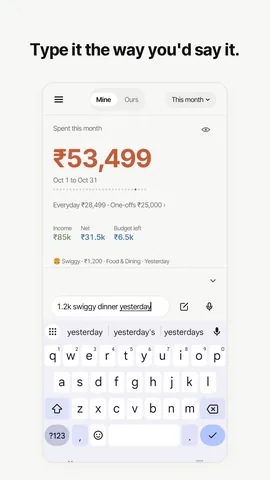
TLDR Classic is an expense tracker for Android that never asks to read your SMS. You type a spend the way you’d say it, like “chai 20”, or say it, and it’s saved. Home screen widgets and a Quick Settings tile log a spend in a second, and you sign in with Google.
Last updated
How it works
- Install TLDR Classic from Google Play and sign in with your Google account. Every new account gets Pro free for 30 days, with no card.
- Write your first spend the way you’d say it: “chai 20”, “taxi 240 yesterday”. The amount, category and day are worked out as you type, and it’s saved.
- Add a widget or the tile. Add a TLDR Classic widget to your home screen for two quick-add buttons, or add the Log a spend tile to Quick Settings.
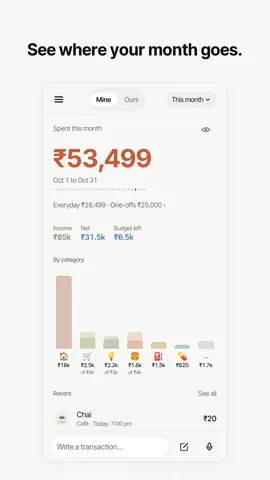
- Set a budget, if you want one. Set a monthly budget and one for each category, and Home shows what’s left of each.
Why it doesn’t need your SMS
Many expense trackers on Android read your bank’s text messages. Android lets an app ask for that, but the permission covers every message on the phone, OTPs included, not only the bank alerts. TLDR Classic never asks for it. Your ledger is made of what you write, say or share: a typed line, a spoken one, the full form, repeating entries for rent and subscriptions, and on Pro, the screenshot of a UPI payment. What SMS permission actually grants is worth reading before you give it to any app.
What TLDR Classic asks for on Android
| Access | Asked for? | What it’s for |
|---|---|---|
| SMS and call logs | Never | Entries come from what you write, say or share. |
| Contacts and location | Never | Nothing in the app needs them. |
| Other apps’ notifications | Never | The app doesn’t read notifications from your bank or UPI apps. |
| Your photos | No permission | A UPI screenshot comes through the share sheet or Android’s photo picker, one picture at a time. |
| Microphone | When you first use voice | Speech is turned into text on the phone. The audio is never recorded or sent. |
| Notifications | For reminders | A daily reminder at a time you choose, or none. |
| Internet | Yes | Signing in, and syncing your ledger through servers in Mumbai. |
Log a spend without opening the app
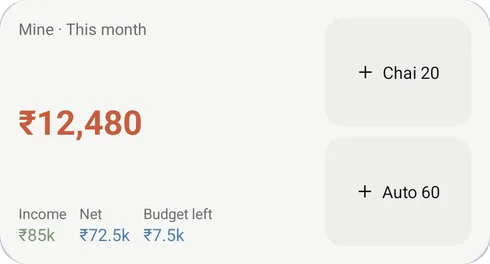
TLDR Classic has two home screen widgets, small and medium, each with two quick-add buttons for the things you log most, like “Chai 20” or “Auto 60”. A tap logs it. The Quick Settings tile, Log a spend, opens the app with the keyboard up. A long press on the app icon offers Log a spend, Ask and Quick log, a one-line box over whatever you are doing that saves to the ledger you used last, without opening Home.
Made for Android
- Sign in with Google. Your entries sync through servers in Mumbai, so they’re on every phone you sign in to.
- App lock with your fingerprint, face or screen lock, and a privacy eye that hides every figure.
- Works offline, and syncs when you’re back online.
- Voice on the phone. On phones that can recognise speech on the device, say it instead of typing it.
- Billing through Google Play. Pro is ₹399 a month or ₹2,999 a year in India, and you cancel it in Google Play.
- Import and export. Bring in a CSV or Excel file from another app, and download all your data at any time.
- Android 8.0 or later.
What’s only on iPhone
A few things depend on iOS: logging Apple Pay purchases through a Shortcuts automation, Siri, Lock Screen widgets, the Control Centre and Action button controls, and notifications for budget alerts and a partner’s new entries. Everything else, including UPI screenshots and a shared ledger for couples, works the same on both, and a shared ledger works across the two. Expense tracking on iPhone covers the other side.
Keep reading
Questions worth asking
Does TLDR Classic ask for SMS permission on Android?
No. It never asks to read your SMS, call logs, contacts or location. Entries come from what you type, say or share, such as a UPI payment screenshot on Pro.
Which Android version does TLDR Classic need?
Android 8.0 or later. Voice entry needs a phone that can recognise speech on the device; everything else works without it.
Can I add an expense from my Android home screen?
Yes. The home screen widgets have two quick-add buttons each, the Quick Settings tile opens the app ready to type, and a long press on the app icon offers Log a spend, Ask and Quick log.
Do I need a Google account to use TLDR Classic on Android?
Yes. You sign in with Google, and your entries sync through servers in Mumbai, so they are on every phone you sign in to.
Is TLDR Classic free on Android?
There is a free plan with no limit on entries. Pro is ₹399 a month or ₹2,999 a year in India, billed through Google Play, and every new account gets Pro free for 30 days with no card.
Does TLDR Classic work offline on Android?
Yes. You can log entries without a connection, and they sync when you are back online.
Get TLDR Classic on Google Play
Every new account starts with 30 days of Pro, no card needed. On Android now. The iPhone app is in Apple’s review.

iPhone: coming soon
This describes TLDR Classic for Android as of October 2026. It explains how the app works, not what to do with your money.