A budget app that doesn’t connect to your bank
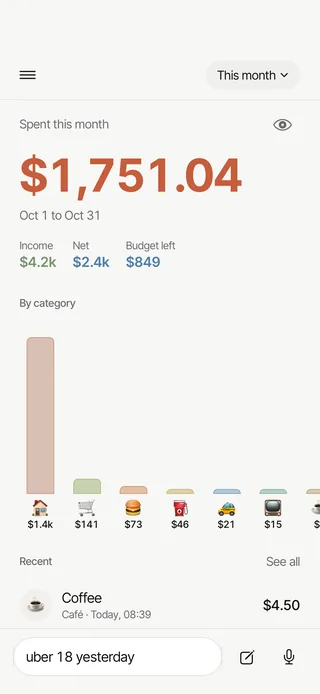
TLDR Classic is a budget app that never connects to your bank. You write each spend as a short line, like “groceries 62”, or say it, and the app works out the amount, the category and the day, then counts it against your budget. It asks for no bank login and reads no SMS or email.
Last updated
How it works
- Set a monthly budget. Add a total for the month and, if you like, limits for a few categories. Budgets are on every plan.
- Write a spend the way you’d say it. Type a line like “coffee 4.50” or “dinner 48 yesterday”, say it, or fill in a form. The app works out the amount, the category and the day.
- Let the regular ones add themselves. A repeating entry adds the rent or a subscription on its day, and home screen widgets have two quick-add buttons for the spends you make most.
- See where the month went. Home shows what you’ve spent and what’s left of the budget, and Ask answers questions like “how much on groceries this month?”
Why it doesn’t link to your bank
Linking a bank account gives a budget app a feed of your transactions, and to get that feed you hand over a bank login or a standing consent to read your accounts. TLDR Classic asks for neither. It is manual by design: every entry is one you wrote, said or imported, so the app holds what you chose to record and nothing more.
It also means cash, your half of a dinner and money sent to a friend go in the same way as a card payment, because nothing depends on what a bank feed can see. Most lines are read on your phone, without any AI, in a second or two. What an automatic feed misses.
Ways a budget app can get your spending
| Method | What you hand over | What the app can see | On iPhone |
|---|---|---|---|
| Linking a bank account | Your bank login, or a consent to read your accounts | Every transaction on the linked accounts | Yes |
| Reading SMS alerts | Permission to read every text message on the phone | Every message, one-time codes included | Not possible: iOS gives no app your SMS |
| Forwarding email alerts | Your bank’s alert emails, sent on to the app | Whatever those emails say | Yes |
| Writing it down (TLDR Classic) | A line like “groceries 62” | Only what you write, say or import | Yes |
TLDR Classic uses the last one, on Android and iPhone alike.
What stays on your phone, and what doesn’t
- Stays on your phone: your voice, because speech is turned into text on the phone and the audio is never recorded or sent; and the arithmetic, because amounts and totals are always worked out on your phone.
- Goes to TLDR Classic’s servers, in Mumbai: your entries, so they sync and come back when you sign in on a new phone, and bill photos, only if you attach one.
- Goes to the AI, only after you agree: a line the phone can’t read, an Ask question, and entry names it can’t place in a category. They go to Claude, by Anthropic, never with your totals, and none of it is used to train AI models.
- Never asked for: a bank login, your SMS or your email.
You can turn the AI features off in Settings. The phone’s own reading, the form and everything else keep working; Ask is the one feature that needs them. You can also download all your data, or delete your account, from inside the app.
How Ask answers without seeing your entries
Ask answers questions like “how much did I spend on eating out last month?” For Ask, the AI never receives your entries. It gets your question, your category and tag names, your currency, today’s date and the day your month starts (in a shared ledger, also the name your partner chose), and turns the question into a search. Your phone runs that search on your own entries and writes the answer from fixed templates, so every number comes from the app, never from the AI.
Each answer shows its working: the categories, the dates and the number of entries it counted, and a tap opens exactly those entries. Ask remembers nothing between questions, can’t change anything, and doesn’t give financial advice.
Bring your history with you
If you kept a spreadsheet, or used another app, TLDR Classic reads a CSV or Excel file on your phone and brings its entries in. Import is free on every plan, and it works offline like everything else.
What it costs
Writing entries, budgets, repeating entries, widgets and a full data download are free, with no limit on entries, and the free plan shows this month and last. Pro adds all your history, AI entries and Ask with no monthly limit, a ledger shared with a partner, bill photos, and CSV and PDF export. Pro is US$3.99 a month or US$24.99 a year (₹399 or ₹2,999 in India), and your store shows your price before you buy. Every new account gets Pro free for 30 days, no card needed. TLDR Classic isn’t offered in the European Union, Russia, Belarus or China mainland.
Keep reading
Questions worth asking
Is there a budget app that doesn’t connect to my bank?
Yes. TLDR Classic never connects to a bank: you write each spend as a short line, like “groceries 62”, or say it, and the app files it and adds it up. It never asks for a bank login, and never reads your SMS or email.
How do I track spending without linking my bank account?
Write each spend down as you go. In TLDR Classic a line like “coffee 4.50” takes a few seconds, repeating entries add fixed costs like rent on their day, and widgets log a regular spend in a tap.
Does Ask send my spending to the AI?
No. Ask sends the AI your question, your category and tag names, your currency and the date, never your entries, and the app counts the answer from your entries on your phone. Separately, a line the phone can’t read goes to the AI to be read, after you agree, and your totals never do.
Can I use a budget app offline?
Yes. TLDR Classic works offline: entries you write without a connection are saved on the phone and sync when you are back online.
Can I import my spending history without connecting my bank?
Yes. TLDR Classic reads a CSV or Excel file, such as a spreadsheet you kept or an export from another app, on your phone and brings its entries in. Import is free on every plan.
Keep your bank out of your budget
Every new account starts with 30 days of Pro, no card needed. Writing entries and budgets stay free after that. On Android now. The iPhone app is in Apple’s review.

iPhone: coming soon
This describes how TLDR Classic works as of November 2026. It is not advice about your money.